Getting Started With Alkira And Terraform - (Part 1)
  1. Posts/

Getting Started With Alkira And Terraform - (Part 1)

William Collins
Author
William Collins
Building at the intersection of cloud, automation, and AI. Host of The Cloud Gambit podcast.
Table of Contents
Getting Started With Alkira And Terraform - This article is part of a series.
Part 1: This Article

HashiCorp’s Terraform needs no introduction. It is all but the de facto vehicle for delivering cloud infrastructure, and for a good reason. What Terraform did for Multi-Cloud Infrastructure as Code, is precisely what Alkira does for the network. What happens when you use these two platforms together to deliver networking in and across clouds? If providing network services in code faster than ever before sounds interesting, this multi-part series is for you. Need a quick primer on Alkira? You can read up here.
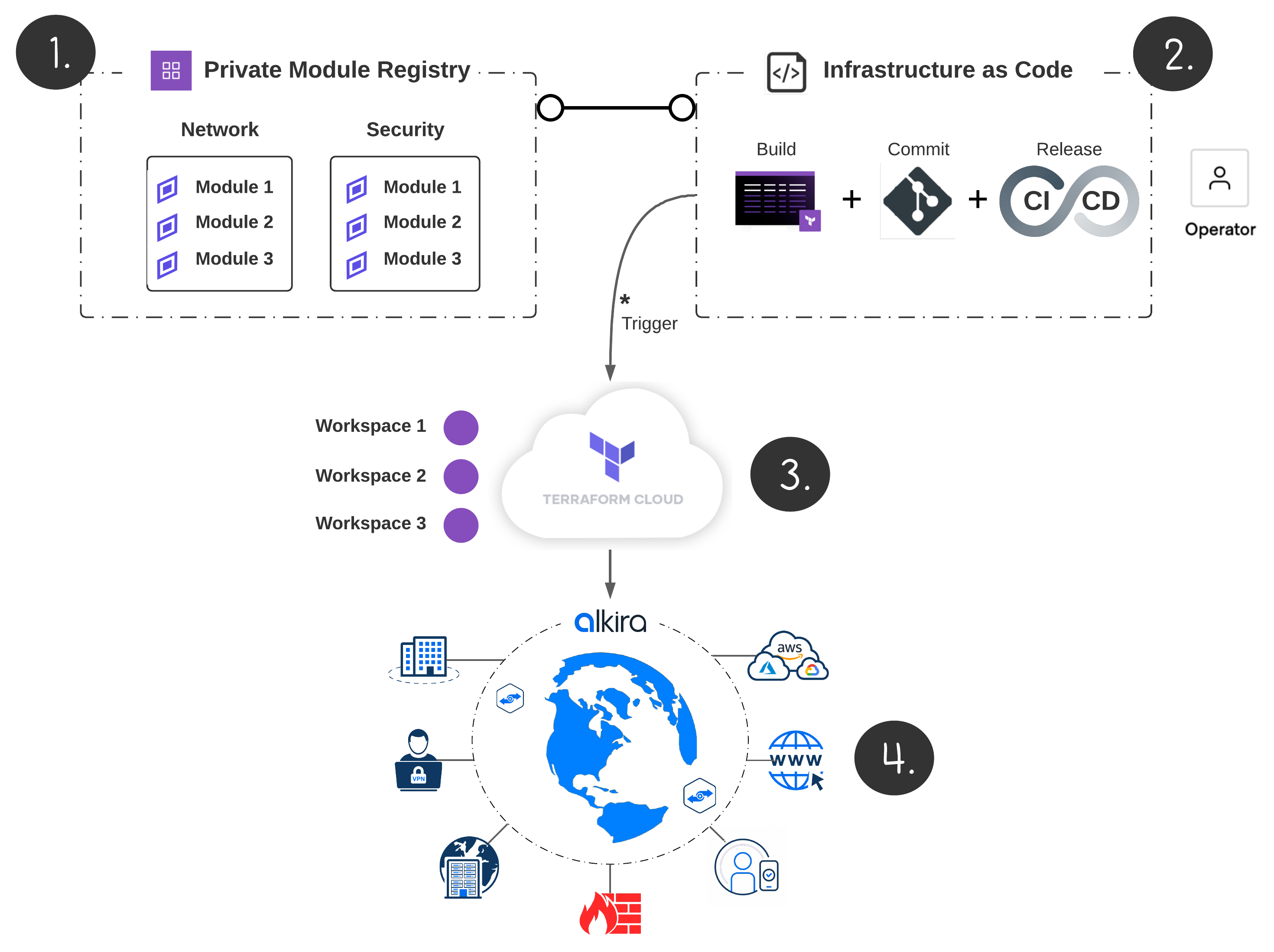
Intro
Intro

A Scalable Foundation
#

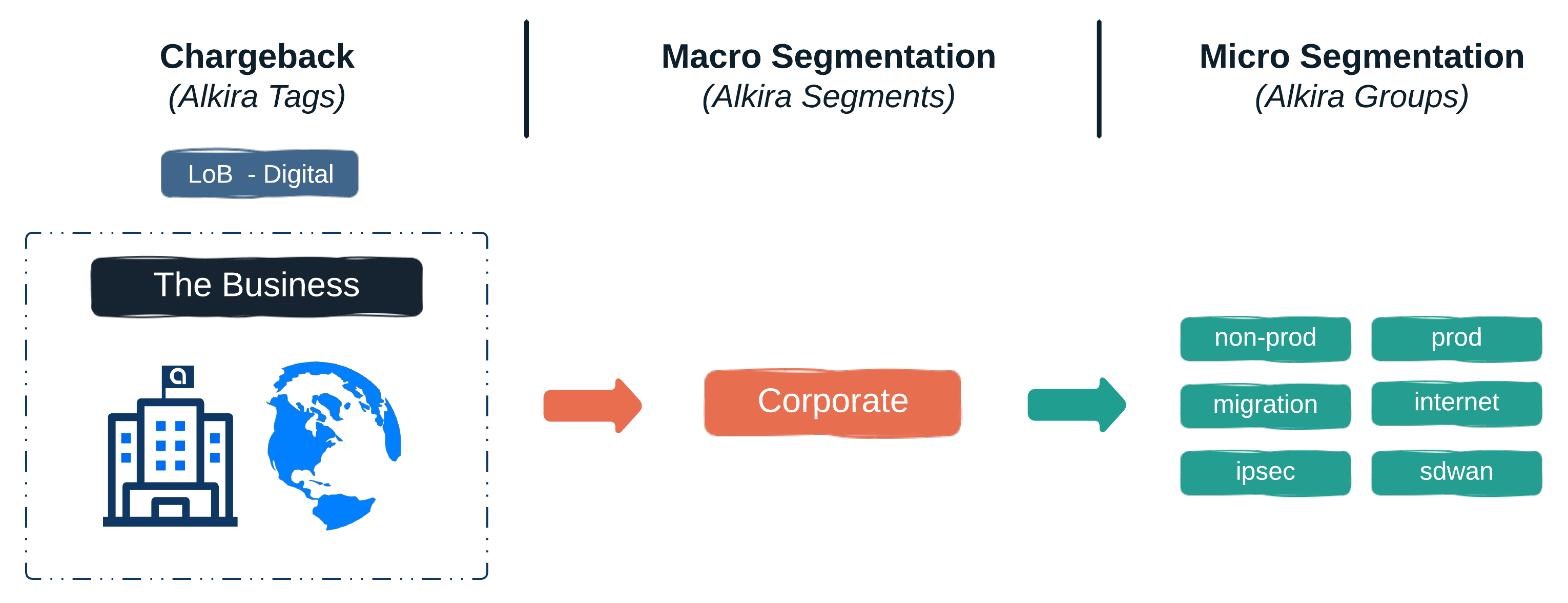
Troubleshooting networks that have been over-engineered can be tricky. Some of the most reliable networks I have worked in were also the most simple by design. Simple is easier to understand, automate, and scale. To begin this series, let’s deploy the following:

  • A Segment for macro-segmentation; (We will deploy additional segments in a later post to demonstrate Partner and Acquisition connectivity scenarios)
  • Groups for micro-segmentation; These will be used for policy enforcement once we start connecting cloud and on-premises networks
  • A Billing Tag mapping to a hypothetical Line of Business (Let’s say Digital Transformation); Being able to bill specific app or product teams for network consumption is a game-changer
  • An Internet Exit for users, sites, and clouds along with elastically scaled VM-Series Firewalls for our IPS, IDS, and ALG needs

Segmentation Layout
#

Segment Layout
Layout

In Alkira, segments and groups are scaled globally, across clouds, and on-demand. To learn more about how Alkira handles segmentation, check out this design zone video.

Let’s Build!
#

Segmentation
#

Alkira’s Terraform Provider makes it easy to build networking the DevOps way. The following snippet creates our segment and groups used for macro and micro segmentation.

alkira_segments.tf

 1
 2
 3
 4
 5
 6
 7
 8
 9
10
11
12
13
14
15
16
17
18
19
20
21
22
23
24
// Groups
locals {
  group = ["non-prod", "prod", "migration", "ipsec", "sdwan", "internet"]
}

// Create segment
resource "alkira_segment" "corp" {
  name = var.segment_name
  asn  = var.segment_asn
  cidr = var.segment_cidr
}

// Create groups
resource "alkira_group" "group" {
  count       = length(local.group)
  name        = local.group[count.index]
  description = "Group ${local.group[count.index]}"
}

// Create billing tag
resource "alkira_billing_tag" "tag" {
  name        = var.tag
  description = "Billing Tag ${var.tag}"
}

Internet Egress
#

The following code will provision an Internet Connector with VM-Series Firewalls. These scale to real-time capacity demand while symmetrically steering application traffic using intent-based policies.

Internet, Intranet, and Private-Spoke security zones will be provisioned on the Firewalls with each zone mapping back to the corresponding Alkira Groups which provide the baseline for segmentation and policy

alkira_internet.tf

 1
 2
 3
 4
 5
 6
 7
 8
 9
10
11
12
13
14
15
16
17
18
19
20
21
22
23
24
25
26
27
28
29
30
31
32
33
34
35
36
37
38
39
40
41
42
43
44
45
46
47
48
49
50
51
52
53
54
55
56
57
resource "alkira_connector_internet_exit" "connector" {
  
  // Connector values
  name        = var.name
  cxp         = var.cxp
  group       = var.group
  size        = var.size
  segment_id  = var.segment_id
}

resource "alkira_service_pan" "ngfw" {
  
  // Service values
  name                  = var.service_name
  cxp                   = var.cxp
  size                  = var.size
  license_type          = var.license_type
  type                  = var.pan_type
  version               = var.pan_version
  management_segment_id = var.mgmt_segment_id
  segment_ids           = [var.segment_id]
  credential_id         = var.credential_id
  panorama_enabled      = false
  max_instance_count    = 1

  // Instance values
  instance {
    name          = var.instance_name
    credential_id = var.credential_id
  }

  //
  // Security zones
  //
  
  // All internet, untrusted
  zones_to_groups {
    segment_name = var.segment_name
    zone_name    = "internet"
    groups       = ["internet"]
  }

  // Branch, DC, CoLo (Private Network)
  zones_to_groups {
    segment_name = var.segment_name
    zone_name    = "on-premises"
    groups       = ["ipsec", "sdwan"]
  }

  // Cloud Connectors
  zones_to_groups {
    segment_name = var.segment_name
    zone_name    = "cloud"
    groups       = ["non-prod", "prod", "migration"]
  }

}

Provision On Pull Request
#

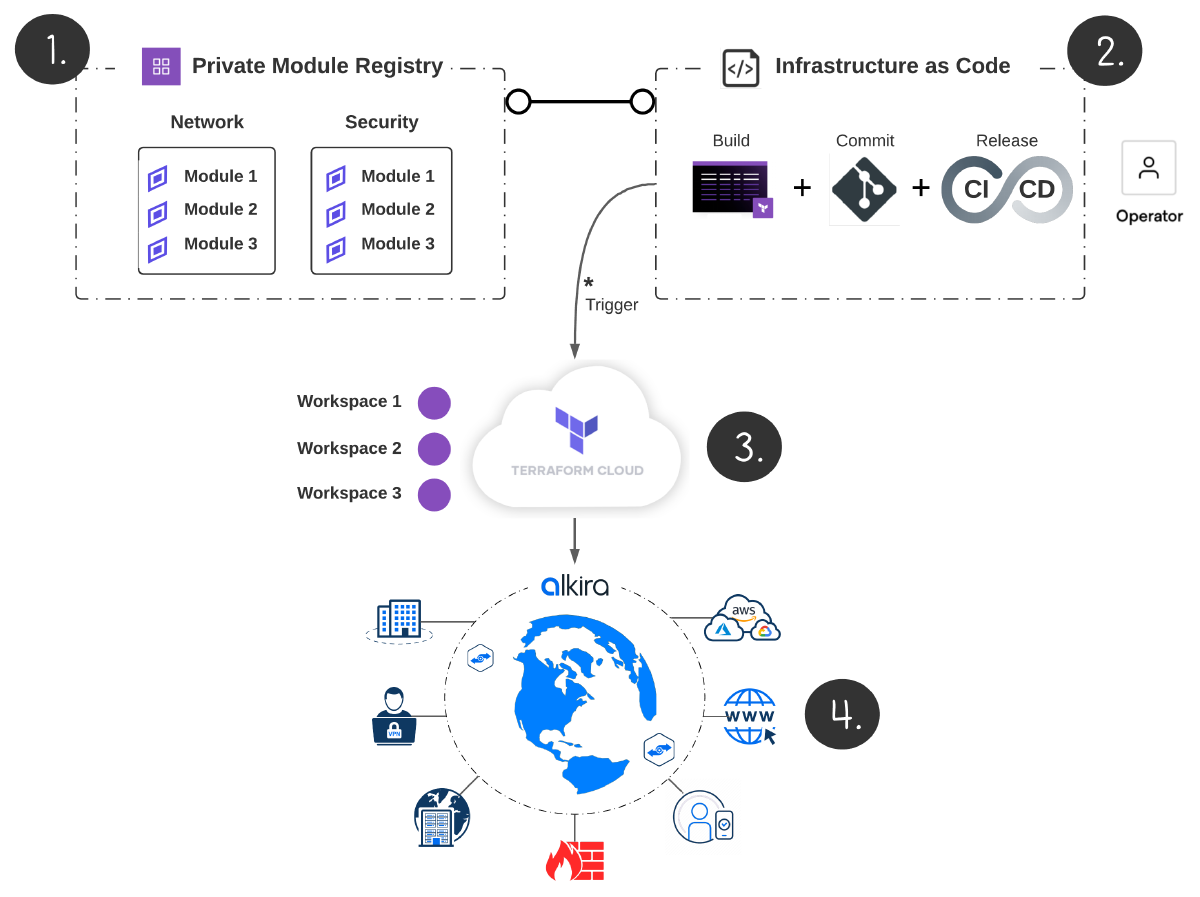
I’m a big fan of Terraform Cloud. For this example, I have my infrastructure committed to Github with Terraform Cloud runs triggered automatically as changes get merged in version control.
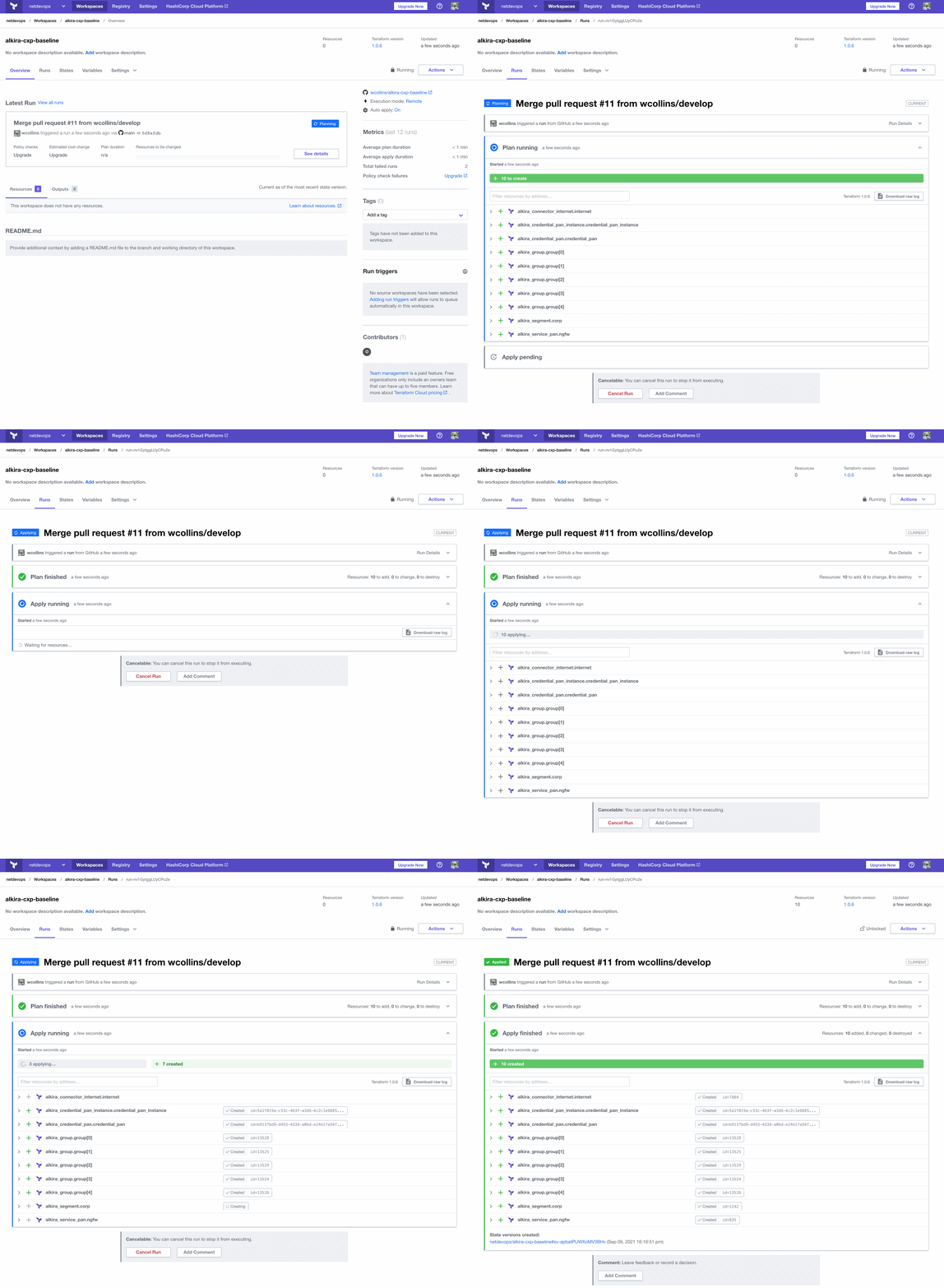
Provision Infrastructure
Provision

Validation
#

Alkira has a very refined interface which serves as a great visual aid to validate configuration and policy. As we add more infrastructure later in this series, we will use the UI to gain a greater perspective into each aspect of the network.
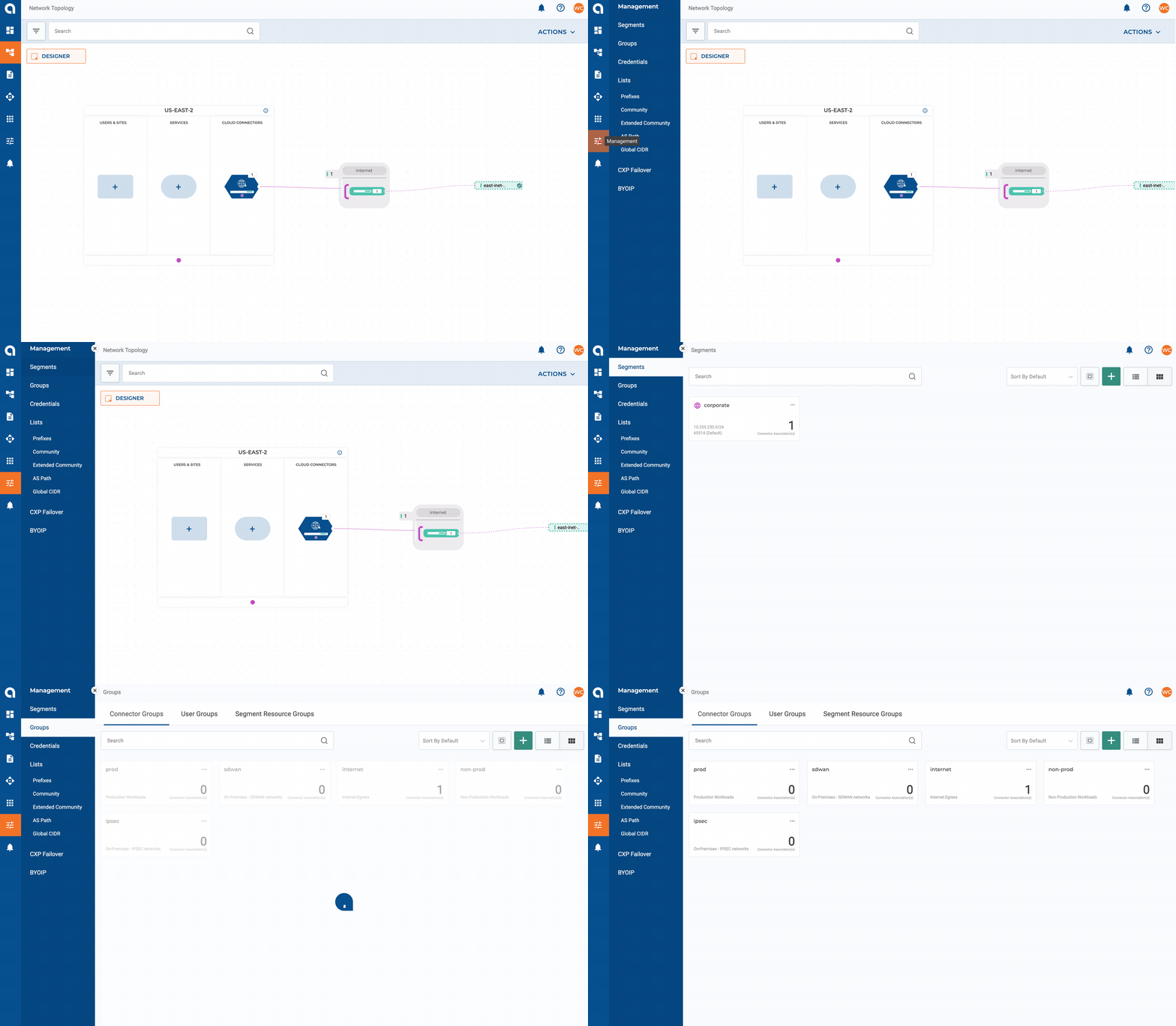
UI Validation
Validation

Conclusion
#

The place where applications, data, and systems intersect is the network. Networks of the future must adapt and scale over time as businesses grow, markets change, and policies adapt. Elastic networking driven by automation is the future. In Part 2, we will connect a mix of AWS, Azure, and GCP networks to demonstrate just how easy Alkira can make the multi-cloud network experience, so stay tuned!
Getting Started With Alkira And Terraform - This article is part of a series.
Part 1: This Article

Related

Intro To Terraform Modules With AWS

Effectively automating infrastructure is no longer a luxury but a staple in the enterprise move through future transformation. I wrote a blog recently about using Terraform with Packer together, and wanted to take this thought further with breaking down Terraform Modules and getting well connected with Terraform Cloud. I recently put together a simple module for building base infrastructure in AWS for the purpose of testing Alkira Network Cloud. Let’s dive in!

Cloud Grade Automation With Packer and Terraform

Manually provisioning infrastructure slows down application delivery, isolates knowledge, can hamper operations teams, and doesn’t scale. Automating infrastructure provisioning can address these challenges by shifting manual process into code. Hashicorp has products spanning the infrastructure, security, and application stack that can unlock that cloud operating model and deliver applications faster.