In Part 1, we laid out our foundation. In Part 2 and Part 3 we connected various networks (both cloud and on-premises) and provisioned NGFWs that scale to real-time capacity. By default, networks connected to our corporate segment have full-mesh connectivity to each other. Let’s build some policies in code that can work with the groups we created to produce logical micro-segmentation that mirror a few real-world use cases.
Scenario#
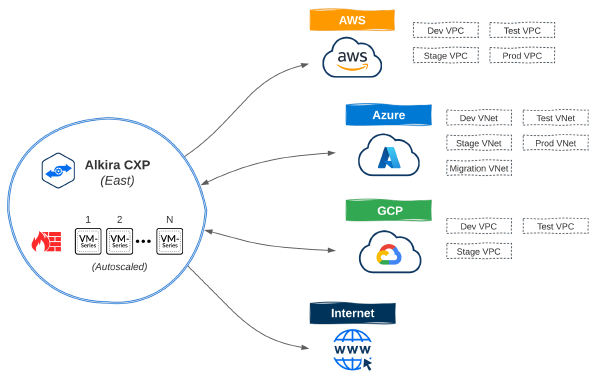
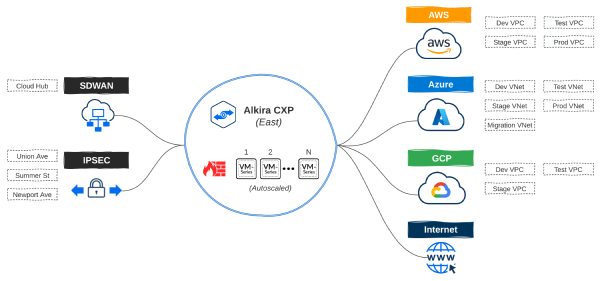
Before moving on to policy requirements, let’s recap the infrastructure provisioned in the previous posts:
- DEV, TEST, STAGE, and PROD networks in AWS and Azure for cloud native applications
- Additional MIGRATION network in Azure for application migrations from on-premises
- DEV, TEST, and STAGE networks in GCP for a new product that is not yet in production
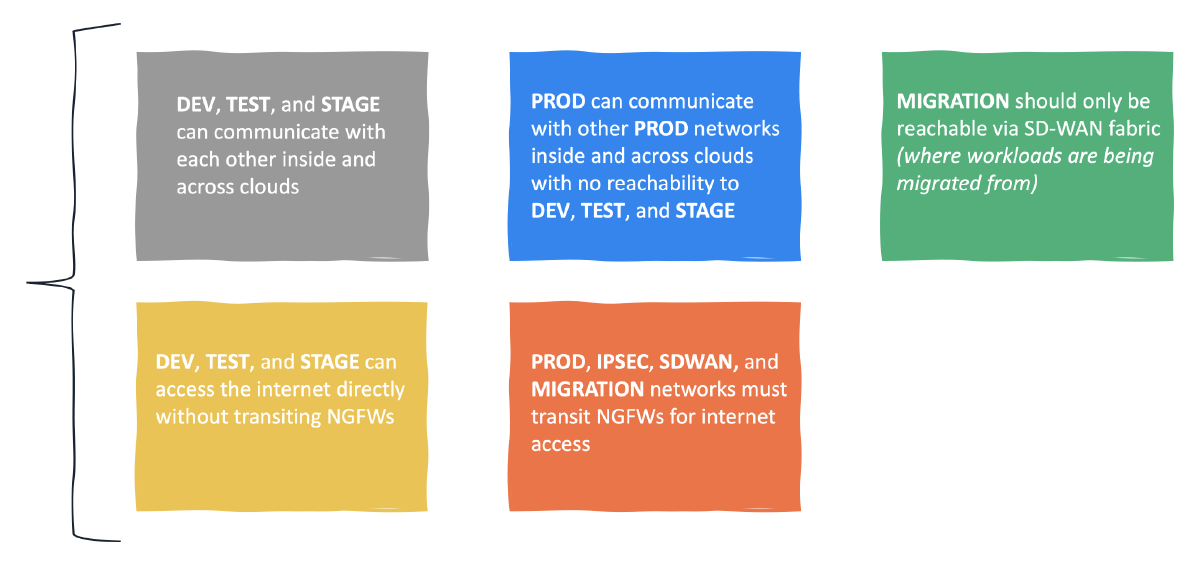
- Alkira Groups non-prod, prod, migration, internet, ipsec, and sdwan for micro-segmentation
- Internet Exit for users, sites, and clouds along with elastically scaled Palo Alto NGFWs
Policy Requirements#

I wanted these requirements to be grounded in reality. Segmenting application environments, isolating migration workloads, and selectively steering traffic to different services can be challenging when considering Hybrid Multi-Cloud. Defining these policies in code is a big step towards integrating NetSecOps into network and security workflows.
Without Terraform#
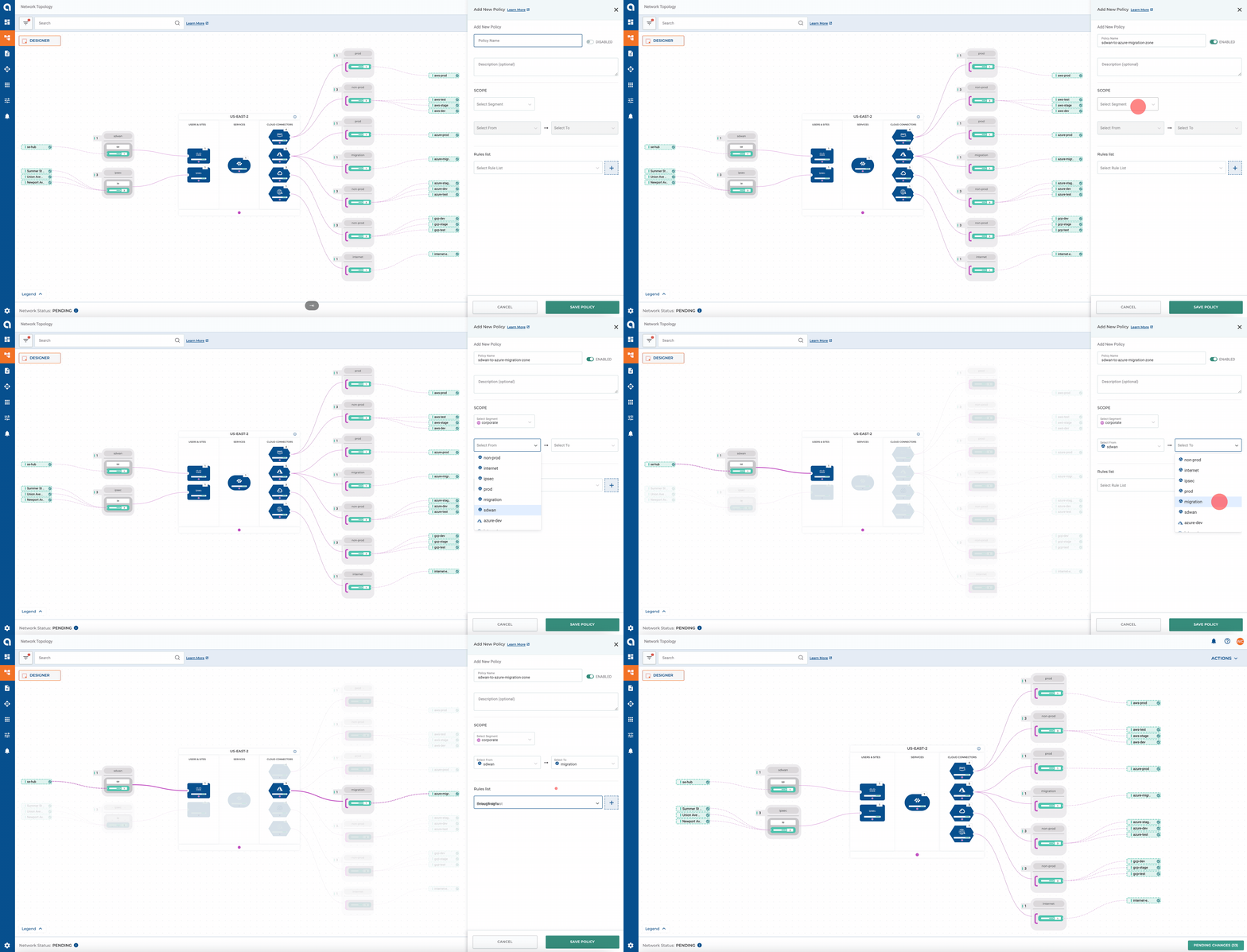
Alkira makes it simple to define policies manually via the portal. A great benefit of doing it this way is to visualize the outcome of a given policy in real-time. To get a better idea of the process, let’s create a sample policy to allow communication from our Cisco SD-WAN mesh to the Azure migration zone:
Building Policies With Terraform#
Alkira uses a flexible policy-driven architecture for controlling traffic and enabling service insertion. These policies can be built and enforced without knowing the IP addresses or subnets that represent sites, cloud networks, or applications.
Resources#
| Name | Type | Description |
|---|---|---|
| alkira_policy_prefix_list | resource | Manage Prefix Lists |
| alkira_policy_rule | resource | Manage Rules |
| alkira_policy_rule_list | resource | Manage Rule Lists |
| alkira_policy | resource | Manage Policies |
Prefix Lists#
Although defining subnets as resources isn’t required, it can make sense to categorize larger blocks of space together, like RFC1918 private address space.
alkira_policy_prefix_list.tf
| |
Rules#
Custom rules can be defined to control routing. For increased flexibility, rules allow matching on community, extended community, as path, and prefix list. You can also do service insertion by using service type to steer traffic through a given service. Palo Alto, CheckPoint, and ZScaler are supported services today.
alkira_policy_rule.tf
| |
Selectively steering traffic to services like NGFWs in hybrid multi-cloud networks comes with many design considerations and challenges. In practice, this can often lead to physical and virtual firewall sprawl across CoLos, Public Clouds, and Sites. A great benefit of using Alkira is significantly limiting this firewall instance sprawl to only what is needed to meet capacity demands. Also, having a simple way of steering traffic as required saves time and simplifies design.
Policies#
Policies contain a rule-list and get applied to connectors. Once an enforcement scaffolding is in place, newly added connectors will automatically inherit the intended policy defined with infrastructure-as-code.
alkira_policy.tf
| |
Validation#
I used Terraform Cloud for provisioning. From the design canvas, we can validate that each policy matches our original intent.

ONUG - Fall 2021#
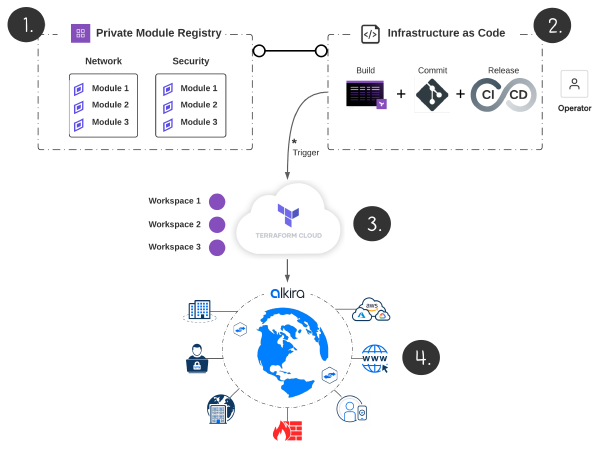
I presented at ONUG - Fall 2021 on using infrastructure-as-code to build a production-grade hybrid multi-cloud network. The majority of what I covered in this blog series, I demonstrate in real-time using Github in tandem with Terraform Cloud’s Version Control Workflow. To get a better idea of how this looks, check out the session:
Conclusion#
Automation is now a business imperative that underpins elasticity and intersects directly with business outcomes. In this blog series, we deployed a production-grade network spanning multiple clouds and sites with unified segmentation and security services, all via code and delivered using CI/CD. Keep a lookout for new content as I explore integrating Alkira with other tools and services!
Acknowledgements#
Big thanks to Ken Guo for taking the time to peer-review and offer such thoughtful insight.