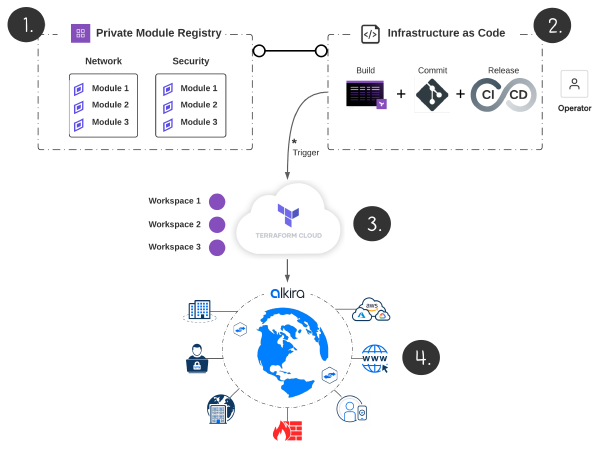
There is a reason why enterprises prefer the best-of-breed approach to connect and secure their network and intellectual property. Alkira announced its integration with Fortinet at AWS re:Inforce in July, and this is a perfect example of the best in action. As anyone that reads my blog knows, I have an automation first approach to everything. Alkira’s Terraform Provider is Fortinet ready, so let’s take it for a spin!

Key Features#
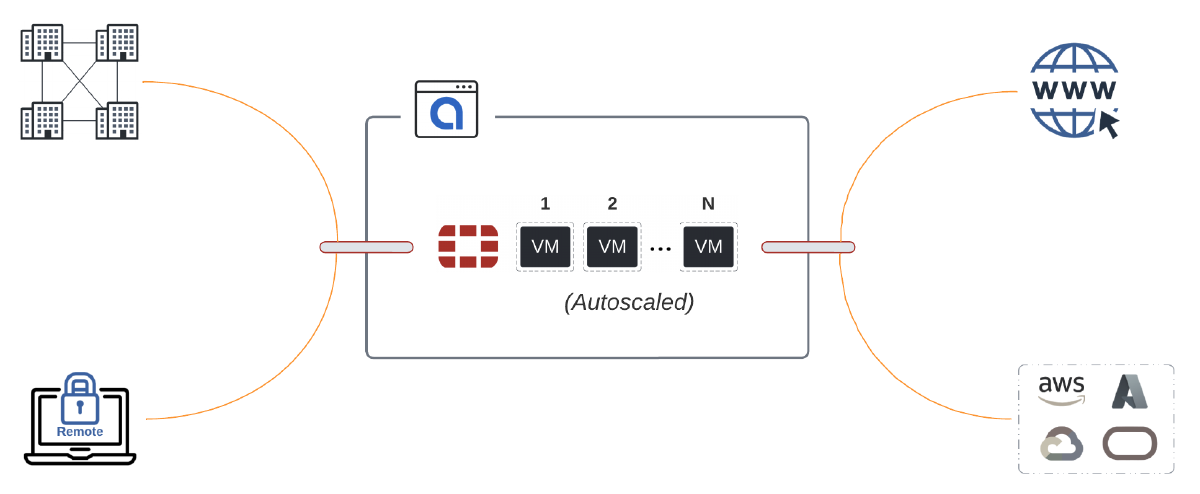
This partnership comes packed with great features, including the seamless integration of FortiManager (which orchestrates the Fortinet Security Fabric), extending existing firewall zones into and across clouds with auto-mapping of zones-to-groups, and weathering traffic surges with auto-scaling.
Coming from the Data Center world, configuring firewalls for high-availability has its challenges. Since firewalls are stateful, if traffic ingresses firewall-a and egresses firewall-b, you break state since firewall-b has no session. With Alkira, FortiGate instances run active/active and traffic symmetry is handled natively. Consistent hashing is inserted into the forwarding layer to detect failures and transition to available instances.
The Plan#
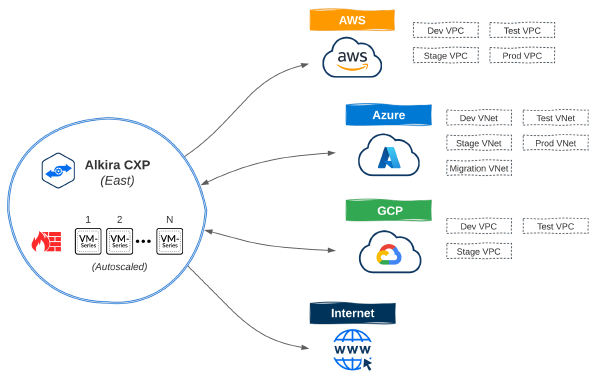
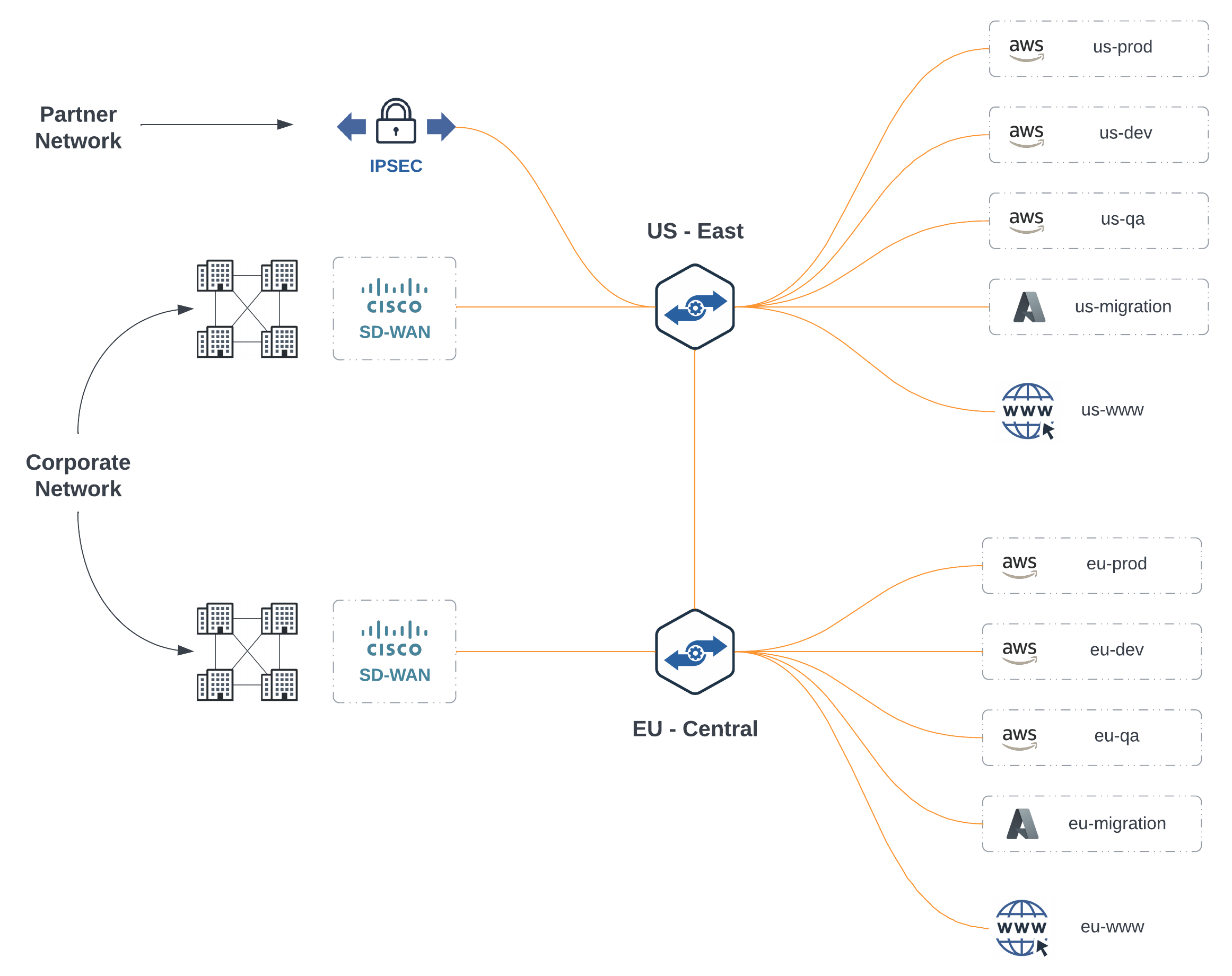
For this exercise, I decided to include a mix of Hybrid Multi-Cloud and Multi-Region to play with, and why not cross continents too? I already have an SD-WAN fabric extended into East US and Central EU regions along with an IPSEC tunnel. For cloud, I have several networks connected from AWS and Azure with Multi-Cloud Internet Exit. This gives us plenty of options for selectively forwarding traffic to the FortiGates for east/west, north/south, and internet bound traffic.
Existing Topology#
Scoping Criteria#
First, let’s scope out the basics of what we want to deploy:
- FortiGates running FortiOS: 7.0.3 deployed in all regions
- Register with on-premises FortiManager
- Minimum: 2 / Maximum: 4 auto-scaling configuration
- Extend existing on-premises FortiGate zones across all clouds
Policy Criteria#
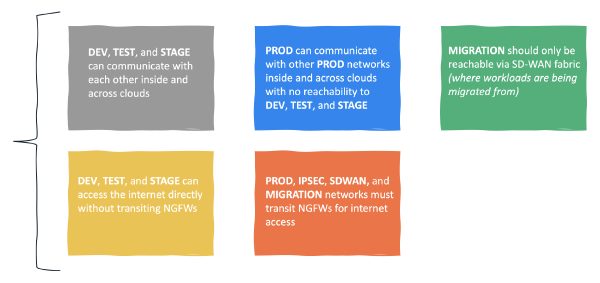
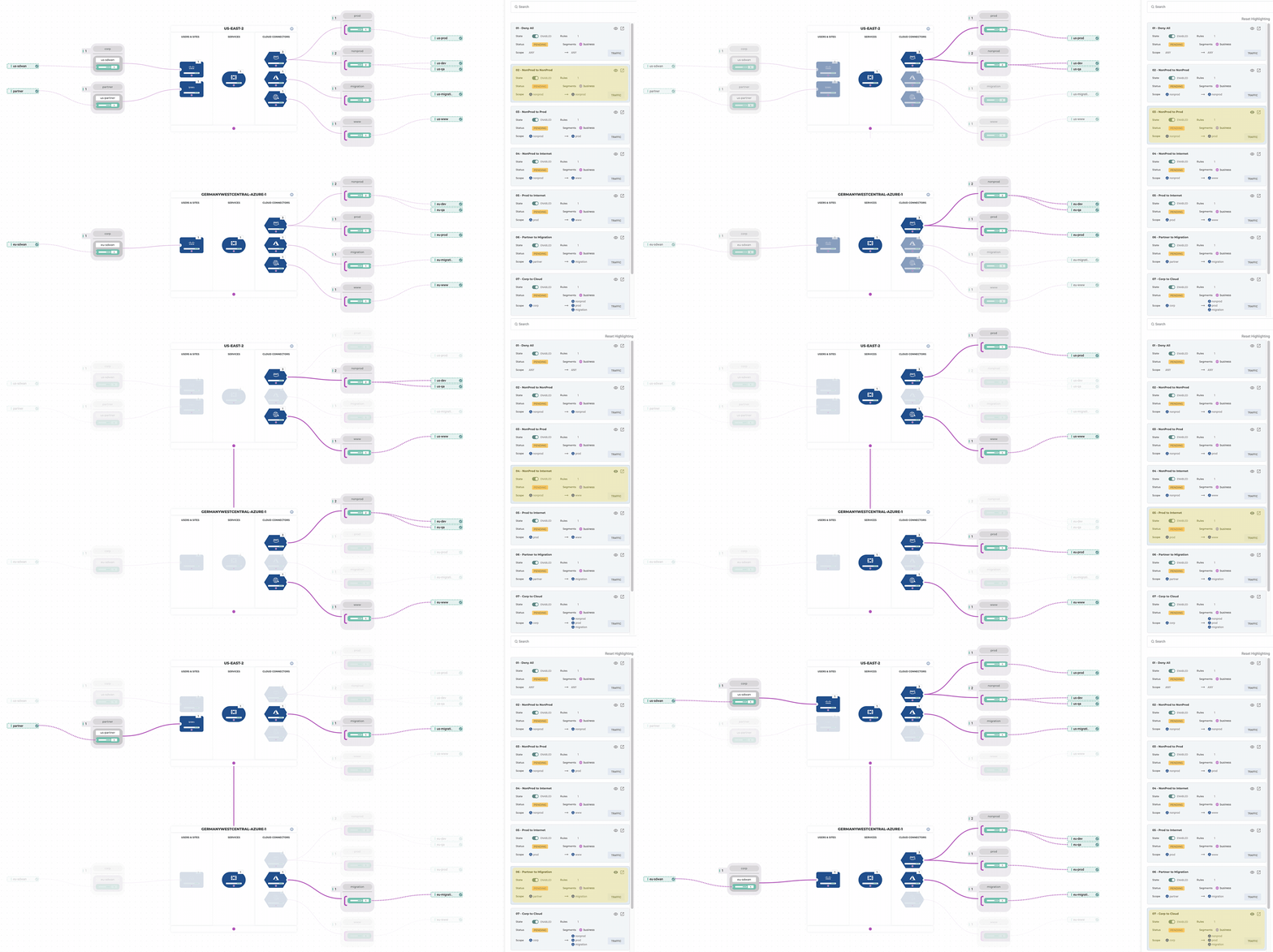
Second, let’s define what traffic we want to steer through the FortiGates and what should be left alone.
- Deny any-to-any by default
- Non-Prod can talk to Non-Prod directly but must pass through a FortiGate when talking to Prod
- Non-Prod can egress to the internet directly, but Prod must first pass through a FortiGate
- Partner can talk to migration cloud networks only but must first pass through a FortiGate
- Corporate can talk to all cloud networks but must first pass through a FortiGate
The partner requirement above is pretty standard. As organizations look to modernize using the public cloud, often, they will work with a preferred partner to give them a strong start and avoid mistakes in the beginning that would otherwise set them back. These partners generally have access to the environments in scope for modernization only.
It may be tempting to forward all traffic through NGFWs. Meeting compliance requirements, especially when protected data is involved, can be challenging. However, it does not make sense when examining cloud principles and cost. Identify traffic required to transit firewalls if possible for compliance or other meaningful reasons. If you have sandbox cloud networks that have no access to data or any other intellectual property, does it make sense to forward all that traffic through a firewall?
Let’s Build!#
We could create separate resource blocks for each FortiGate we want to deploy, but that would be unsightly. For this example, let’s use [count](https:// to create multiple services and dynamic blocks to handle the nested schema for instances.
Some Locals#
We need to deploy the service twice since we are working across two regions. Let’s define names for the service, the regions we are deploying for, instance configurations for when auto-scaling occurs, and some values for policies. I have a separate variables.tf file with var type: list(map(string)) that I have the instance names and serials defined in, so I’m just looping through those here.
| |
Fortinet Configuration#
Since we already have segments and groups provisioned, we can reference them in our main.tf file. This configuration will provision a Fortinet service per region, connect back to our FortiManager instance on-premises, map our existing firewall zones to Alkira groups for multi-cloud segmentation, and auto-scale to handle load elastically.
| |
Policy Configuration#
Now, we can selectively steer traffic to the FortiGates. Policy Resources can take a list of ids for source and destination groups. This is why I defined the to_groups and from_groups in local variables. We can simply loop through each set, return the IDs, and provide them as a single value to the policy resource.
| |
Validation#
Let’s validate our policies to make sure they are meeting requirements. Alkira’s ability to visualize policy comes in handy when reviewing multi-cloud policy, traffic flows, and network security more broadly. Having the ability to integrate this into the DevOps Toolchain makes for a great experience.
Conclusion#
Ever heard of that single product that solved all your organization’s network and security problems? Me neither! Valuable integrations like this one solve real problems. With the explosion of cloud services, it pays to zoom out and think about the long game. Building a strategy for your organization to support the legacy applications you can’t migrate, the applications on deck for migration to the cloud, and greenfield applications across multiple clouds, is a winning strategy. Alkira and Fortinet are two products that can help shift your focus to outcomes.