
For many moons, importing existing infrastructure (that is to say, infrastructure running outside of Terraform state), has not been a trivial task. Historically, Terraform did not generate any configuration. You would have to write the infrastructure-as-code in a manner that reflects how it was deployed. Then, to make matters not easier, you would fetch the ‘ol shovel and dig out the unique resource identifiers to feed through the command line. Handling a single resource in this manner is pretty simple. Wrangling 20+ resources like this is not. Last month, Terraform v1.5.0 was released, offering the ability to use import blocks. Let’s test this new feature on my favorite infrastructure provider, Alkira.

Why is this Useful?#
This feature shifts import from a CLI driven approach to configuration-driven and plannable actions for adopting existing resources. Here are the key takeaways:
Configuration-Driven: You can now declare imports within your Terraform configuration files using an import block, making the process more streamlined and part of the initial planning.
Plannable Action: Terraform treats importing as part of a standard plan. Running terraform plan will show a summary of the resources that Terraform intends to import, along with other planned changes.
Preservation of existing CLI command: The existing terraform import CLI command remains unchanged and can still be used separately.
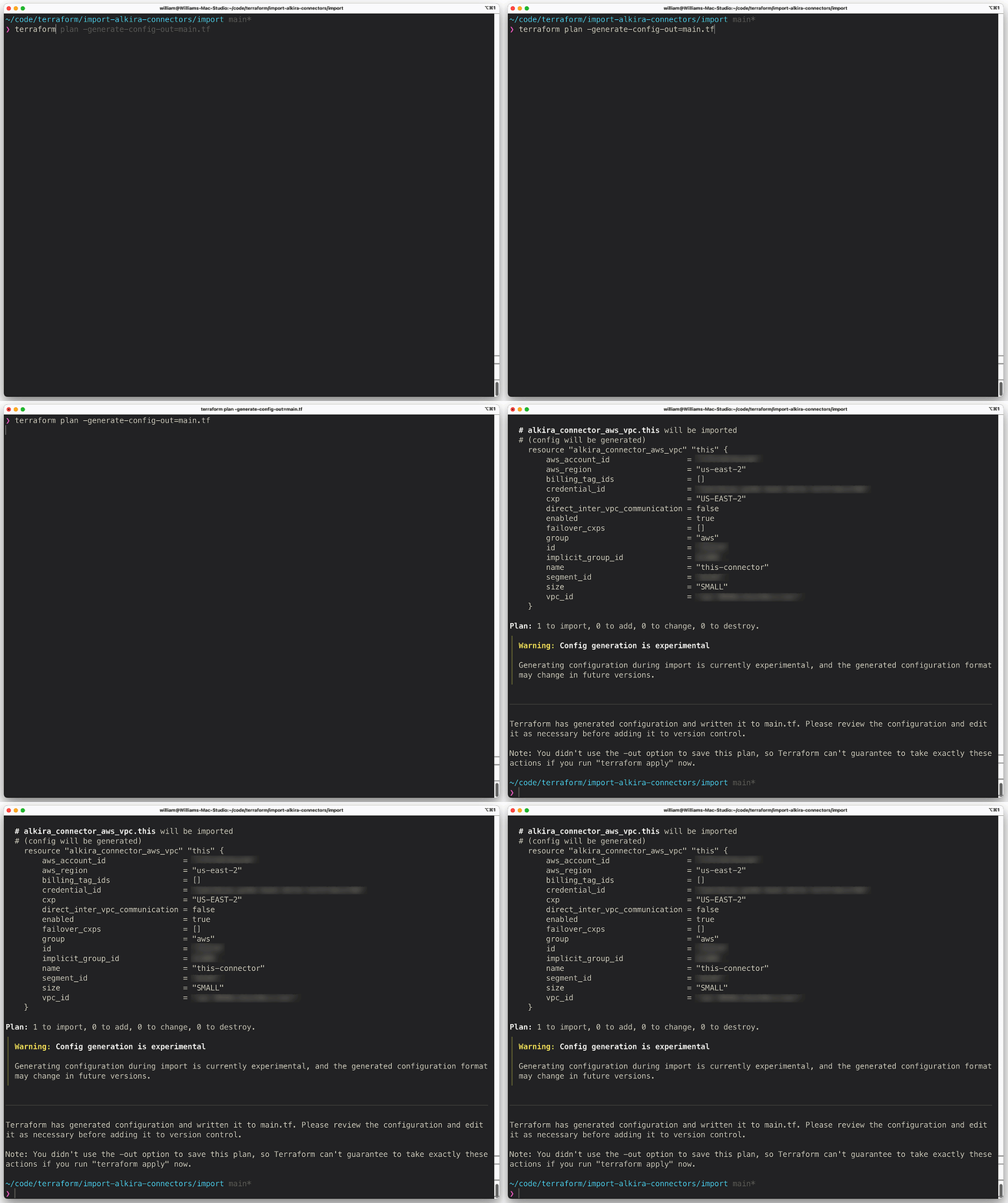
Support for Generating Configuration for Imported Resources: This feature, used in conjunction with the import block, enables templating of configuration when importing resources. A new flag -generate-config-out=PATH is added to terraform plan. When this flag is set, Terraform generates an HCL configuration for any resource included in an import block that doesn’t already have an associated configuration, writing it to a new file at the specified PATH.
A Common Scenario#
In this scenario, I’ll build an AWS VPC and connect it to Alkira using the alkira_connector_aws_vpc resource. This is a pretty common scenario I see with our customers. They begin a proof-of-concept for a particular use case and do most of the testing via Alkira’s excellent user interface. Instead of building a new environment for production however, a lot of times, they will want to take the proof-of-concept to production. From here, they need to import what has already been built into the appropriate Terraform State file.
Building some Infrastructure#
I’m going to mock-up the infrastructure we will import using Terraform.
| |
Importing that Infrastructure Somewhere Else#
Now that we have some infrastructure to work with, along with the resource identifiers, let’s put import blocks to the test. First, we create an import block for the Alkira connector in a file called imports.tf in a separate directory. I defined the connector_id returned from the previous configuration into a new variable called var.connector_id:
| |
Next, we initialize this separate directory containing the new Terraform configuration. Once everything is initialized, we can run -generate-config-out=main.tf which generates the following:
Conclusion#
This is a great feature that saves time. If I had to guess, as more functionality and polish is added, you’ll see modules popping up that leverage import blocks and provide a simplified way to import larger swaths of infrastructure. Some tools exist out there to do this today. Last year, I wrote about one such tool - Azure Terrafy. The difference is that since this is now integrated with the Terraform configuration and planning process, it can keep all of the logic in the HashiCorp ecosystem. No messing around with fetching binaries or needing to do any third-party tricks.